How to Choose the Best CRM for Real Estate Agents in 2026
Updated September 27, 2026 · 4 min read
A CRM is where a real estate business lives: every lead, client, past client, conversation and task. The right one makes follow-up automatic; the wrong one becomes an expensive address book. This guide explains what matters, the main types of real estate CRM, well-known options, and a checklist for choosing — plus the one layer most CRMs don't provide on their own.
We don't sell a CRM. PropertyMediaIQ's Buyer Intelligence adds qualification data to your CRM (with Lofty sync today). Product descriptions below are general and neutral; check each vendor for current features and pricing.
What a real estate CRM must do
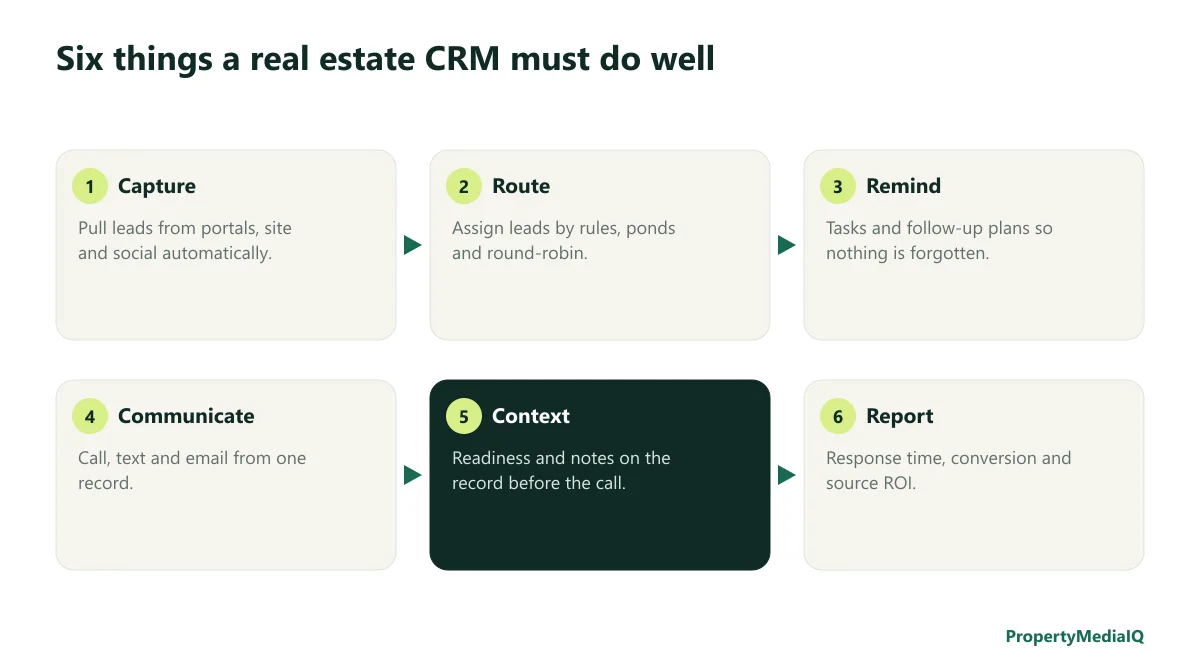
- Capture leads automatically from portals, your website, social ads and open houses — no manual entry.
- Route leads to the right agent by rules: area, price range, language, source, round-robin, or ponds.
- Remind — tasks, follow-up plans and smart lists so no lead is forgotten.
- Communicate — call, text and email from the contact record, with history logged.
- Provide context — notes, activity, and readiness information visible before every call.
- Report — response times, conversion by source, and pipeline value.
The three types of real estate CRM
| Type | What it includes | Best for |
|---|---|---|
| All-in-one platforms | CRM plus IDX website, lead generation ads, marketing automation | Teams that want one system and run paid lead gen |
| Lead-focused CRMs | Strong lead routing, calling/texting, integrations with many lead sources | Teams with high online lead volume and multiple sources |
| Simple contact managers | Contacts, tasks, email drips, transaction tracking | Solo agents with a referral-based business |
Well-known real estate CRMs
These are widely used options in the U.S. market. Descriptions are general — features change, so evaluate current versions.
- Lofty (formerly Chime) — an all-in-one platform with CRM, IDX websites, lead generation and automation; popular with teams.
- Follow Up Boss — a lead-focused CRM known for lead routing, integrations with many lead sources, and team accountability; part of Zillow.
- BoldTrail (formerly kvCORE, by Inside Real Estate) — an all-in-one platform frequently provided by brokerages.
- Sierra Interactive — IDX websites, lead generation and CRM, aimed at teams running paid lead generation.
- Real Geeks — IDX websites and lead generation with a built-in CRM.
- Wise Agent and LionDesk — simpler CRMs and contact managers suited to smaller operations.
Many brokerages provide a CRM as part of their technology package — check what you already have before buying.
A buying checklist
| Question | Why it matters |
|---|---|
| Does it connect to every lead source I use? | Manual entry kills speed to lead |
| Can I route by rules and use ponds? | Teams need fair, fast distribution |
| Does it have a mobile app agents actually use? | Most follow-up happens on the phone |
| Can I call and text from the record, with logging? | Keeps history in one place |
| Are follow-up plans easy to build and edit? | Automation only helps if it's maintained |
| What reporting is included? | You can't improve response time you can't see |
| What integrations exist (transaction management, marketing, qualification)? | The CRM is a hub, not the whole system |
| How hard is it to export my data? | You should own your database |
| Total cost per user, including add-ons? | Pricing can scale quickly with a team |
Implementation matters more than the brand
The most common CRM failure isn't picking the wrong product — it's incomplete setup. Before rolling out:
- Define lead stages everyone uses the same way.
- Connect every lead source.
- Write routing rules and a maximum unclaimed time.
- Build three follow-up plans: ready now, warm, early.
- Require a next task on every active lead.
- Review weekly: response time, leads without tasks, appointments set.
See why real estate leads die in the CRM.
The missing layer: qualification
Every CRM stores leads. Few tell you, when a new lead arrives, whether they're pre-approved and moving in two months or browsing for next year. Behavioral scores (site visits, saved searches) show interest, not readiness. Readiness comes from direct answers: timeline, financing, budget, motivation.
That's the gap Buyer Intelligence fills:
- a branded assessment link you send with your first reply;
- a readiness score, report and AI call brief for each lead;
- a lead inbox sorted by readiness and next action;
- on the Team plan, Lofty sync: the matching Lofty lead receives the score, category, a note, a follow-up task and a link to the report. Lofty stays the source of truth for contacts, routing and ponds.
Setup guide: connecting Lofty to your lead workflow. Related: how to qualify buyer leads before the first call.
Recommendations by business type
| Your business | What to prioritize |
|---|---|
| Solo, referral-based | Simple CRM, strong past-client follow-up, reminders |
| Solo, online leads | Lead-source integrations, speed to lead, texting, qualification |
| Team with ponds | Routing rules, accountability reporting, qualification context on the record |
| Brokerage | Brokerage-provided platform, onboarding, data ownership, integrations |
Frequently asked questions
What is the best CRM for real estate agents? The one that connects to your lead sources, fits your team structure, and your agents actually use daily. Teams running online leads often favor lead-focused CRMs or all-in-one platforms; referral-based solo agents often need something simpler.
Is Lofty a CRM? Yes — Lofty is an all-in-one real estate platform that includes a CRM.
Does Buyer Intelligence replace my CRM? No. It adds readiness data and call briefs, and syncs into Lofty on the Team plan.
Give your CRM the context it's missing
Know which buyers are ready before you call.
Share one branded link and get a readiness score, report, and call brief for every lead — from $39/month.