Virtual Tours vs. Listing Video vs. Photos: Which Do Buyers Actually Use?
Updated September 27, 2026 · 5 min read
Agents are often asked — by sellers, and by themselves — whether a listing "needs" a virtual tour, a video, or just great photos. The honest answer is that these formats aren't substitutes. Each answers a different buyer question at a different moment in the search. Understanding which question each answers is the key to spending your marketing budget well.
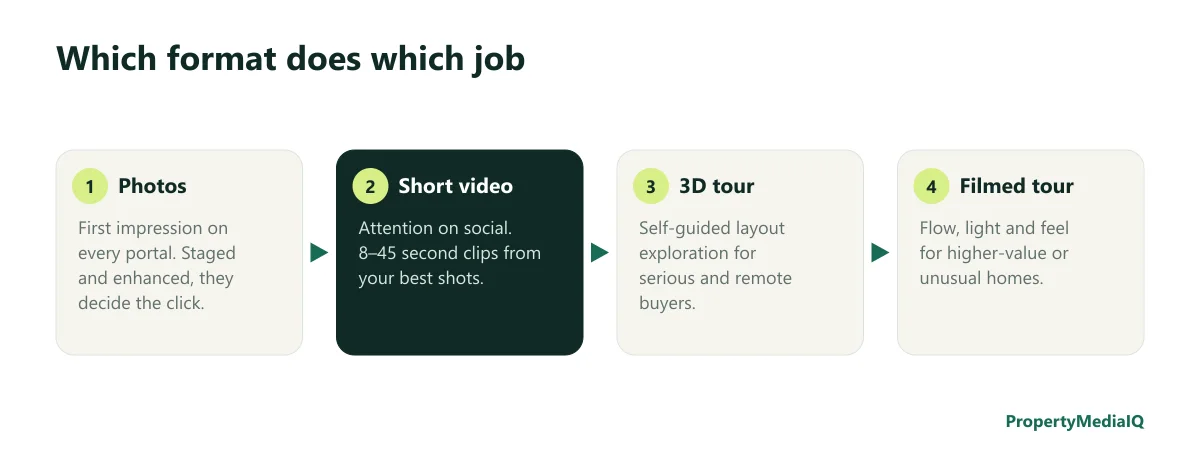
The four formats
1. Photos — "Is this worth a closer look?"
Every buyer sees photos first, on every portal. They decide whether a listing gets clicked, saved and shared. Nothing else matters if the photos don't earn the click.
- Cost: a professional shoot, plus editing, staging and twilight as needed.
- What makes them work: a strong hero image, finished rooms, correct exposure, and a complete set. See the listing photography checklist and virtual staging before and after.
2. Short listing video — "Stop scrolling"
Clips of 8–45 seconds for Instagram, TikTok, YouTube Shorts and Facebook. Their job is attention and reach — putting the listing in front of buyers who weren't searching yet.
- Cost: from about $19 per AI-generated clip with Property Video, or a filmed short from a videographer.
- What makes it work: a strong first three seconds, one idea per video, on-screen text. See property video marketing.
3. 3D virtual tour — "Let me walk through it myself"
A navigable 3D model captured with a specialized camera (or, increasingly, a phone with a capture app). Buyers move from room to room at their own pace, often with a dollhouse view and measurements.
- Cost: typically priced per property by square footage from a photographer or capture service, or a camera and software subscription if you capture yourself.
- What makes it work: a complete capture, good lighting, and embedding it prominently on the listing page.
- Best for: buyers who are seriously interested, remote and relocation buyers, larger or unusual layouts.
4. Filmed walkthrough — "How does it feel to live here?"
A 2–5 minute edited tour following the path a buyer would walk, showing flow, light, scale, views and the neighborhood.
- Cost: from a few hundred to over a thousand dollars per listing, depending on market and production. See real estate video cost.
- Best for: higher-value homes, lifestyle properties, and listings where the experience is the selling point.
Side-by-side comparison
| Photos | Short video | 3D tour | Filmed walkthrough | |
|---|---|---|---|---|
| Main job | Earn the click | Earn attention on social | Self-guided layout exploration | Convey flow and feel |
| When buyers use it | First look | While scrolling | Shortlisting | Serious consideration |
| Typical length | 20–40 images | 8–45 seconds | Self-paced | 2–5 minutes |
| Relative cost | Base | Low (AI) to medium (filmed) | Medium | Medium to high |
| Time to produce | Same day to 2 days | Minutes (AI) to days | 1–3 days | Several days |
| Remote buyers | Helpful | Somewhat | Very helpful | Very helpful |
| Social reach | Moderate | High | Low | Moderate |
Recommended combinations by listing type
| Listing | Recommended set |
|---|---|
| Entry-level, rentals | Edited and staged photos + floor plan + 2–3 AI video clips for social |
| Mid-market | Photos + floor plan + AI launch reel; 3D tour if layout is complex or buyers are remote |
| Upper-mid, relocation-heavy | Photos + floor plan + 3D tour + AI clips; filmed tour if budget allows |
| Luxury | Full set: photos, twilight, 3D tour, filmed walkthrough, drone where relevant, plus AI clips for weekly social posts |
| New construction | Photos of finished units, renderings, 3D tour of the model, video of amenities |
Floor plans: the underrated fifth format
Buyers use floor plans right after the hero photos to understand how the rooms they just saw connect. They're inexpensive and fill the biggest gap photos and short videos leave. See AI floor plans for real estate.
Accessibility and honesty
- Label edited and AI-generated media: virtual staging, twilight, and AI video clips. See disclosing AI-generated listing video.
- Keep tours current: if the home changes (furniture removed, repairs made), update the tour or note the difference.
- Add captions to videos for buyers watching without sound.
For sellers: how to explain the plan
Sellers often ask for "a video" because they've seen one on a neighbor's listing. Show them the job each format does and propose a plan that fits the property and price point — backed by examples. That conversation is a big part of winning the listing; see the listing presentation that wins sellers.
Turning viewers into buyers you can help
Tours and videos create engaged viewers. The best time to learn about them is right after they engage: add a short questionnaire link next to the tour and video ("Want similar homes or a private showing? Answer 3 quick questions"). Buyer Intelligence turns those answers into a readiness score and call brief.
How to produce each format efficiently
Photos: one professional shoot; edit, stage and convert the hero exterior to twilight the same day. See real estate photo editing services.
Short video: generate AI clips from the finished photos on launch day; cut a 20–30 second reel; post feature clips through the first two weeks.
3D tour: capture at the same visit as photos where possible, so the home is prepared once; check that every room is included and lights are on.
Filmed walkthrough: plan a shot list around the path through the home; schedule for good light; keep the edit under three minutes for most listings.
Measuring what each format contributes
| Format | What to measure |
|---|---|
| Photos | Portal views, saves, click-through from search results |
| Short video | Views, watch time, shares, profile visits, link clicks |
| 3D tour | Tour sessions and time in tour (from the tour provider) |
| Filmed tour | Views and average view duration on the listing page and YouTube |
| All | Enquiries and showing requests in the first 14 days |
Compare listings over time rather than judging a single property — the pattern is what tells you which formats earn their cost in your market.
Frequently asked questions
Is a 3D virtual tour better than video? They do different jobs: tours help serious buyers explore the layout; short videos earn attention on social; filmed walkthroughs convey feel.
Do all listings need a virtual tour? No. They're most valuable for larger or unusual layouts and remote buyers.
What's the cheapest way to add video to every listing? AI-generated clips from your listing photos — about $19 per clip.
Start with the format every listing can afford
Turn one listing photo into a video.
An 8-second cinematic property clip from a single photo for $19 — plus listing descriptions and social posts.